Hello Friends! I am excited to share a quick and easy circle card that I created in Cricut Design Space. It features a cute flamingo, palm leaves and a simple hello phrase. This would be a perfect thinking of you card for that special someone. All the images are included in the Cricut Access Subscription. Also, I am the Guest Diva this week over at Die Cuttin' Divas and the theme this weeks is add a circle. So, be sure to head over there and play.
Showing posts with label Cricut Explore. Show all posts
Tuesday, July 10, 2018
Saturday, August 26, 2017
Cricut Kawaii Pineapple Card
Hello Friends! Today I have a very sweet kawaii inspired card to share with you. I created this card in Cricut Design Space and all the images are available if you have the Cricut Access Subscription. I have been wanting to create a kawaii card with my Cricut for some time and I really wanted her to be a pineapple card. The Cricut Design Space cut file and assemble video are towards the end of this post.
Sunday, August 13, 2017
Cricut - Birthday Bass Card
Hello Friends! Today I want to share a fish shaped card that I created in Cricut Design Space. This is a birthday card I created with my nephew in mind because he loves to fish. This is a quick and simple card that is a bass (blast) to make...sorry for fish puny. All the images are available in the Cricut Design Space Access Subscription. A link to my YouTube process video and the CDS cut file is available at the end of this post.
Wednesday, June 7, 2017
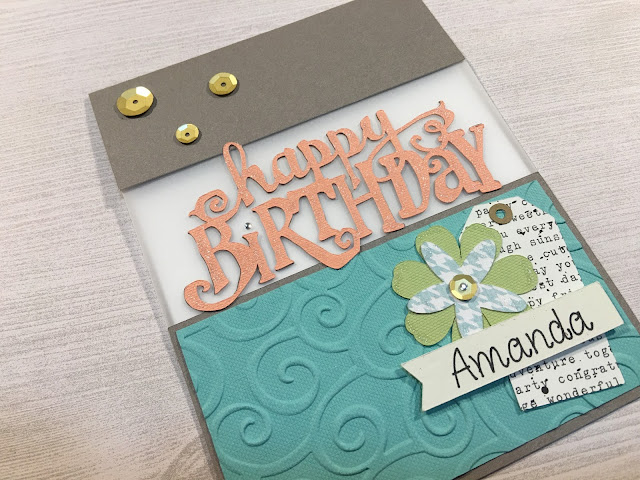
Happy Birthday Split Front Card
Hello Friend! I am excited to share my first
project video tutorial as Kimberly Michelle Designs. Thank you for
stopping by. Get your craftiness prepared as we create a split front
card. This card is specifically for a birthday but the base of card is
very versatile and can be recreated in Cricut Design Space to suit any
occasion. I am putting together a video tutorial that will show how to
create these cards in Cricut Design Space 3. I will share the link for
the Cricut Design Space cut file at the end of this blog. All images are
included in the Cricut Design Space Access Subscription. Update: I included the Mom split front card CDS cut file at the end of this post.
Sunday, March 12, 2017
Cricut St. Patrick's Day Spinner Card
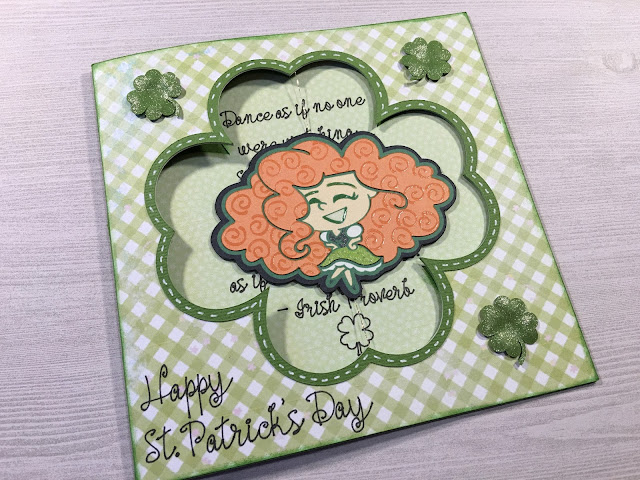
Hello Crafters! I have been wanting to make a spinner card for some time and finally was up for the challenge. I am sorry I am getting this up later than I would like but the tutorials were long and took some time to upload. If you have any questions, please, leave a comment or e-mail me. All the images are available in Cricut Design Space Access. Here is the cut file from Cricut Design Space: https://us.cricut.com/design/#/canvas/54935685
Again, if you have any questions please ask...I love to help. I would appreciate it if you would follow my blog and subscribe to my YouTube channel.
Happy Crafting!
Kimberly
Cricut St. Patrick's Day Spinner Card Part 1
Watch below or Here:Cricut St. Patrick's Day Spinner Card Part 2
Watch below or Here: Again, if you have any questions please ask...I love to help. I would appreciate it if you would follow my blog and subscribe to my YouTube channel.
Happy Crafting!
Kimberly
Friday, February 3, 2017
Wild About You Valentine Card featuring Miss. Kate Cutables
Hello, all! I am excited to share a Valentine's Day card with you. And it is my pleasure to be guest designing for Miss. Kate Cuttables. When I found that I would be creating this card for the month of February I knew exactly what I wanted to create. This card features the following cut files from Miss. Kate Cuttables: Zoo Fun Bundle, Wild About You title, and Nested Hearts.
I include all the measurements for this cute little critter peek-a-boo card. I included a process video (at the end of this post) which shows how I assembled my card. If you would like to see a tutorial on how to create a peek-a-boo card in Cricut Design Space leave a comment. I hope you enjoy!
This card measures 5" x 7" and I used a kraft cardstock for my card base. It is a larger card but I think a child would love this cute critter card.
I used my Cricut Explore for all the die cutting and Cricut Design Space to create the design. These files include a JPEG, PNG, and SVG so that it can be used with most electronic die cutting machines. I created a single panel (left) from kraft cardstock; I find this makes creating dimensional cards easier to assemble. The pink card is my main panel where my little critters come to life. I lined up a heart from the Nested Heart file which created this peek-a-boo frame.
These are the hearts that I created from the Nested Heart file. They are the same size as the heart cut outs on the main panel. I used embossing folders to add texture. It is amazing what a difference this made. These hearts measure 2.19" x 1.95". Using my main pink panel as a template I adhered the hearts to the kraft panel; I show this process in the video.
I wanted to add a layered accent panel for the front of my card. I used the Straight and Slim font in Cricut Design Space to write 'Valentine'. I offset the cream cardstock to the right (when layering; see above photo) to create interest.
For my sentiment I used the Wild About You title. I love all the layers with this sentiment. I used my Xyron Create-A-Stick to adhere the words to the shadow. The title measures 2.4" x 2.3". And it includes some fun tropical leaves.
I just smile when I look at these little critters which are from the Zoo Fun Bundle. I used the PNG file that is included in the bundle and the Print then Cut feature in Cricut Design Space to create my critters. I used Glossy Accents on the eyes and nose to bring them to life.
Here is the process video or watch on YouTube:
I include all the measurements for this cute little critter peek-a-boo card. I included a process video (at the end of this post) which shows how I assembled my card. If you would like to see a tutorial on how to create a peek-a-boo card in Cricut Design Space leave a comment. I hope you enjoy!
This card measures 5" x 7" and I used a kraft cardstock for my card base. It is a larger card but I think a child would love this cute critter card.
I used my Cricut Explore for all the die cutting and Cricut Design Space to create the design. These files include a JPEG, PNG, and SVG so that it can be used with most electronic die cutting machines. I created a single panel (left) from kraft cardstock; I find this makes creating dimensional cards easier to assemble. The pink card is my main panel where my little critters come to life. I lined up a heart from the Nested Heart file which created this peek-a-boo frame.
These are the hearts that I created from the Nested Heart file. They are the same size as the heart cut outs on the main panel. I used embossing folders to add texture. It is amazing what a difference this made. These hearts measure 2.19" x 1.95". Using my main pink panel as a template I adhered the hearts to the kraft panel; I show this process in the video.
I wanted to add a layered accent panel for the front of my card. I used the Straight and Slim font in Cricut Design Space to write 'Valentine'. I offset the cream cardstock to the right (when layering; see above photo) to create interest.
For my sentiment I used the Wild About You title. I love all the layers with this sentiment. I used my Xyron Create-A-Stick to adhere the words to the shadow. The title measures 2.4" x 2.3". And it includes some fun tropical leaves.
I just smile when I look at these little critters which are from the Zoo Fun Bundle. I used the PNG file that is included in the bundle and the Print then Cut feature in Cricut Design Space to create my critters. I used Glossy Accents on the eyes and nose to bring them to life.
Here is the process video or watch on YouTube:
It was my please to create this card for Miss. Kate Cuttables; be sure to visit her store for awesome cut files.
Happy Crafting,
Kimberly
Sunday, May 29, 2016
Cricut Bump in the Night Birthday Card
Hello Crafters!
I wanted to share a boys birthday card that I created with Cricut Design Space. The main characters come for the Cricut cartridge 'Bump in the Night'. All images are included in the Cricut Access Subscription. The Cricut Design Space cut file and video tutorial link are available at the end of this post.
I used the Print then Cut feature in Design Space for my monsters and the Raaaarh sentiment. To give these images depth I used Glossy Accents on the monster faces and the sentiment. I also painted the cut edges with a brush pen, such as Tim Holtz Distress Markers, in a coordinating color. It really gives the images a finished look.
I let my Cricut Explore do the writing for me, as you can see with the inside sentiment. The dot patterned paper is from Simple Stories 'Snap Color Vibe'; I am in love with this little 6 x 6 packet. The color theme for my card is Mustard Yellow, Dark Orange, and Peacock Teal.
Thank you for stopping by today. Please, let me know if you have any questions. The video tutorial will show how to assemble this card; I would appreciate if you would like my video and become a YouTube subscriber.
Also, I made this card for Die Cuttin' Diva's challenge blog - the theme is Polka Dots. Head over and try their challenges; I find them very inspiring. Click HERE to be taken directly to their blog.
Click HERE for the Cricut Design Space cut file.
Click HERE for the YouTube video tutorial or Watch Below.
Wednesday, May 18, 2016
Fishbowl Shaker Card Video Tutorial
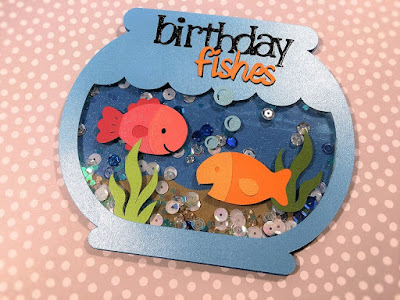
Hello Crafters! I finally completed editing and uploading the video tutorial for my Fishbowl Shaker Card.
Watch Part 1 Below or on YouTube
Please, leave a comment or share a photo of your project on my FaceBook Page - click Here. For the Cricut Design Space cut file - click Here. Just an FYI...if you do not own the cartridge A Child's Year you will need to delete Birthday. You can easily create your own or use one you own. If you need help let me know.
Watch Part 1 Below or on YouTube
Watch Part 2 Below or on YouTube
Please, leave a comment or share a photo of your project on my FaceBook Page - click Here. For the Cricut Design Space cut file - click Here. Just an FYI...if you do not own the cartridge A Child's Year you will need to delete Birthday. You can easily create your own or use one you own. If you need help let me know.
Be sure to become a Follower of this blog and sign up for e-mails so that you can be notified when I share projects and cut files. Thanks for stopping by.
Happy Crafting! Kim
Happy Crafting! Kim
Monday, May 9, 2016
Sunshine & Laughter Card
Hello Crafters!
I wanted to share a quick and happy card with you today that I created with my Cricut Explore.
I created this card for the Die Cuttin' Divas Sketch Challenge. I really love this layout and found it came together quickly. I uses solid white cardstock for the background which I embossed with a Cuttlebug embossing folder 'Juli's Garden'. But before embossing I added a faux stitch around the edge using a light gray pen. The sentiment, which inspired this card, is from Hero Arts 'Everyday Sayings'.
The sun and clouds are from Miss. Kate Cuttables 'Summer Sun'. I used a Peachy Keen 'In the Garden' face stamp to give my sun a little character. I added Wink of Stella to lightest parts of the clouds and then added Glossy Accents to the clouds and my little face. I think she turned out darling. The printed background papers and gems are from an old stash.
You should join in the fun and head over to Die Cuttin' Divas for their sketch challenges - click HERE. Happy Crafting Everyone!
I wanted to share a quick and happy card with you today that I created with my Cricut Explore.
I created this card for the Die Cuttin' Divas Sketch Challenge. I really love this layout and found it came together quickly. I uses solid white cardstock for the background which I embossed with a Cuttlebug embossing folder 'Juli's Garden'. But before embossing I added a faux stitch around the edge using a light gray pen. The sentiment, which inspired this card, is from Hero Arts 'Everyday Sayings'.
The sun and clouds are from Miss. Kate Cuttables 'Summer Sun'. I used a Peachy Keen 'In the Garden' face stamp to give my sun a little character. I added Wink of Stella to lightest parts of the clouds and then added Glossy Accents to the clouds and my little face. I think she turned out darling. The printed background papers and gems are from an old stash.
You should join in the fun and head over to Die Cuttin' Divas for their sketch challenges - click HERE. Happy Crafting Everyone!
Here is a Cricut Design Space file for a similar card using Cricut Images: https://us.cricut.com/design/#/canvas/40229875
Friday, April 29, 2016
Miss Kate Cuttables Guest Designer Project
Hello Crafters,
This is Kim with The Electric Poppy. I am thrilled to share a project that I created as a Miss Kate Cuttables Guest Designer. When I was offered this opportunity it felt like Christmas. I love Miss Kate Cuttables cut files. I created a shaker card using 3 different cut files: Princess Jewels, Tags, Borders and Corners Set, and Card Phrases. I used the cut files to create my card in Cricut Design Space and they cut out beautifully with my Cricut Explore.
When I saw the Princess Jewels I knew what I wanted to create...a shaker card for my Mom. These jewels were easy to put together and I love all the different colors. My card measures 5" x 7".
Here are some close up shot of the jewels. I used a clear Wink of Stella pen to add shimmer to my lovely jewels. For the shaker bits I used Doodlebug sequins, Martha Stewart Heart Glitter, and clear seed beads.
For the inside I kept it simple. The sentiment 'Thanks' comes from the Card Phases cut file and I used the scallop border from the Tags, Borders and Corners Set cut file.
Be sure to visit Miss Kate Cuttables and remember they give away a free cut file everyday! I want to extend a huge Thank You to Miss Kate Cuttables for the chance to be one of the guest designers; I am honored. And I had a blast creating with these cut files.
If you would like to see a video on how to make this card please leave a comment. Be sure to follow and subscribe to my blog. And you can become a subscriber on YouTube...click Here.
Happy Crafting, Kim
Monday, March 21, 2016
Cricut Circle Card - Cup of Tea
Hi Everyone! I know it has been forever since I have posted anything...I sure have missed you all! Here is a circle card I created in Cricut Design Space. I used the Print then Cut feature in this card. I think this would be a sweet Thank You or Thinking of You card.
I created this card for Paper Crafting Between Countries Facebook group; I am part of the Inspiration Team. The link for the cut file and a YouTube tutorial will be at the end of this post. Please, let me know if you have any questions and I would love to read any comments. Also, I am thinking of doing a video which shows how to use Print then Cut layer...Would you all be interested in that? Please, just let me know.
Click here for the Cricut Design Space file.
Click here for my Facebook page.
Click here for the YouTube video tutorial or watch below:
I created this card for Paper Crafting Between Countries Facebook group; I am part of the Inspiration Team. The link for the cut file and a YouTube tutorial will be at the end of this post. Please, let me know if you have any questions and I would love to read any comments. Also, I am thinking of doing a video which shows how to use Print then Cut layer...Would you all be interested in that? Please, just let me know.
Click here for the Cricut Design Space file.
Click here for my Facebook page.
Click here for the YouTube video tutorial or watch below:
Monday, January 4, 2016
2016: Ready to Get Started
I hope everyone had a wonderful holiday. I am ready to get back to crafting. Here is a sneak peak of my upcoming winter card. I will be making a video tutorial on how to assemble this cute card...so stay tuned and share with a friend. I have a lot to share with you in this new year. Here is a link to my YouTube channel: https://www.youtube.com/channel/UCngF9lrEBPNbcedErvNxuiQ/featured Happy Crafting!
Labels:
Box Card,
Card,
Cricut Design Space,
Cricut Explore
Sunday, November 22, 2015
Thanksgiving Box Card
Hi Crafters! I hope all is well in your world. I can't believe Thanksgiving is fast approaching. I had created this box card in Cricut Design Space and had planned on sharing it earlier this month. I created this little box card using items that are available in the Cricut Design Space Subscription. I also made a video tutorial on how to assemble this card; link for the video and the Design Space file will be at the end of this post. I would love to see a picture if you should recreate this card; you can share on my Facebook page.
For the teddy bear I used the print then cut feature in Design Space. I you want to cut out the layers all you need to do is unflatten the image and change it to the scissor icon from the print icon.
All papers are from Close to My Heart. I used the Sangria paper pack...love it!
Thank you for stopping by and taking a look at my little craft. Have a blessed Thanksgiving!
For the Cricut Design Space click: https://us.cricut.com/design/#/canvas/32814669
Follow me on Facebook: https://www.facebook.com/TheElectricPoppy/
Follow me on YouTube: https://www.youtube.com/channel/UCngF9lrEBPNbcedErvNxuiQ
To purchase the CTMH Sangria paper pack: http://kimberspaperdesign.ctmh.com/Retail/Product.aspx?ItemID=8561
Here is the video tutorial or you can watch HERE
Sunday, November 8, 2015
Craft Haul Video and Giveaway
Hello Crafters! I wanted to share a haul via YouTube video. I purchased crafty goodies from Michaels, Concord and 9th, and Close to My Heart. I mention in the video that if you purchase any Cricut Bundle from my Close to My Heart Store a winner will be chosen to receive the Twinkle Stamp set. In the video I explain why I chose to get the Cricut Artistry Bundle. I did purchase the digital version....great value!
Now to make it even better for my blog subscribers. If you purchase any Cricut Bundle from my Close to My Heart Store a winner will be chosen...if the winner is a blog subscriber you will receive 2 stamp sets...Twinkle and Framed. Framed coordinates with the new Artistry cartridge and Twinkle coordinates with Artiste. Both will be fabulous on their own! These stamp sets are no longer available because they were recent Stamps of the Month. Here are some pictures:
| Twinkle Stamp Set |
| Framed Stamp Set If you are interested in purchasing click on: http://kimberspaperdesign.ctmh.com/ Scroll to the bottom right and click on November Gathering. This Prize and Gathering will close on 11/27/15 and the winner will be chosen and announced on 11/28/15...Good Luck! Here is my Craft Haul video or Watch on YouTube: Happy Crafting, Kimberly |
Sunday, October 25, 2015
Hocus Pocus Card ~ Halloween Card Series #2
I wanted to share the second card in my 2015 Halloween Card Series. She is a glittery witch brewing up some Hocus Pocus. I created this card in Cricut Design Space and used my Cricut Explore to cut out all the elements; except for the card base. The card base is a standard A2 portrait card. All images are included in the Cricut Design Space subscription. I will be giving a card kit that includes all the cut pieces and bling featured in this card. Details and Cricut Design Space link for cut file at end of post. There is also a YouTube video tutorial to help you recreate this card...


The witch shadow comes from 'A Frightful Affair' cartridge. I used the Slice feature in Design Space to eliminate elements I did not want to use. This is an incredible feature! The glittery paper is from the Heidi Swapp collection Marquee Love and is part of thier Halloween release...it is a great value and cuts beautifully. I used Glossy Accents on her hat and boots.
The cauldron is from 'Happy Hauntings' and the star background was created using the Independence Day Rosette from 'Independence Day - 3D Projects' cartridge. Again, used the Slice feature to help make this background. If you would like a demo leave me a comment.
This Hocus Pocus title and label come from the 'Potions and Spells' cartridge. I used Glossy Accents on the letters after they were adhered. The little bling highlights are Itty Bitty Sparkles from Close to My Heart.
Here is a look at the inside of the card. The label is from 'First Few Years' and the broom is from 'Teresa Collins - Chic & Scary' cartridges. The sentiment stamp is from this years Michaels collection.
Thank you for visiting. As a reminder I will be giving away this particular card kit to one of my subscribers. To enter leave a comment with an e-mail address (this is how I will contact you) or you can click the 'Contact Me' at the top and shoot me an e-mail.
For the Cricut Design Space File:https://us.cricut.com/design/#/canvas/31724676
Here is a video tutorial on how to put it all together or click HERE.
Labels:
Card,
Cricut Design Space,
Cricut Explore,
Halloween
Sunday, October 4, 2015
Spooky Ghost Box Card - Halloween Card Series 1
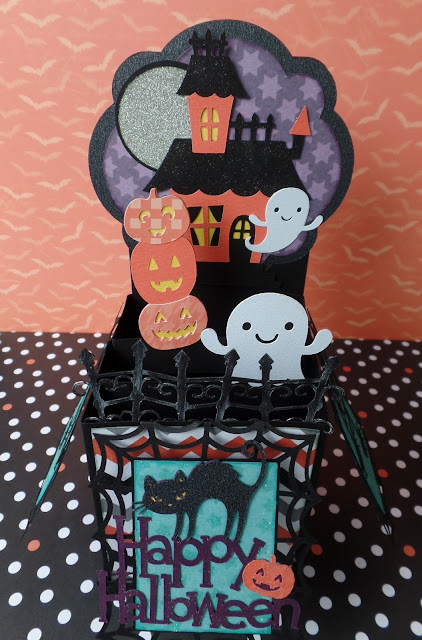
Hey Everyone! I completed my first card for my Halloween card series. The first is a box card and I created a video tutorial as well. The video is in 2 parts because I didn't want to leave any details out. The card measures 3" x 7" when completed and will fit in a 6" x 8" envelope. All images are available in the Cricut Design Space Subscription. Most images are from the Creepy Critter cartridge...a favorite of mine!
I will also be giving away 1 card kit for each of my Halloween cards. The kit includes all the paper die cuts to construct the card. All you need to do is leave a comment with your email address and be a subscriber to my blog and YouTube channel...that is it. Winner will be announced Saturday October 10, 2015. All Cricut Design Space cut files will be available to my subscribers, as well.
I wanted to say...CONGRATULATIONS TO CHERYL MURPHAY! She won the Sunflower Box Card kit.
For the Cricut Design Space cut file - click HERE
For the YouTube video tutorials - click for Part 1 and Part 2
Follow the Electric Poppy on Facebook ...just click!
Happy Crafting, Kim
Most images are from the Creepy Critters Cartridge. This can be used a card or a Halloween decoration. I added a twinkling LED tea light candle to mine and it is just darling!
Labels:
Box Card,
Cricut Design Space,
Cricut Explore,
Halloween,
Home Decor
Subscribe to:
Posts (Atom)